How Web-Based Medical Billing Software Improves Accessibility
Web-based medical billing denotes the recent trend of a healthcare provider successfully managing their account-related activities with the help of online software. It assists clinics, hospitals, and medical billing firms in coping with affected patients' prices, insurance coverage claims, receipts, and billing information. This allows users to access the system via an internet connection instead of depending on software only installed on one machine. A lot of our healthcare organisations and how they arrange full acts with the help of their online billing systems. These systems can then assist the staff in filing insurance claims, monitoring the status of a claim, double-checking payments made, and identifying balances yet to be paid. They can also facilitate communication between billing teams and doctors. Web-based medical billing software is accessed through a web-based interface, rather than being installed locally like traditional desktop software. Only authorised users can sign in from eligible devices and locations. This makes it also suitable for practices that have multiple offices or billers who work remotely. But users must have proper access rights and a secure internet connection.
Medical Billing Over Web: How Does It Work?
Web-based medical billing software supports the financial side of these services associated with clinical care. In other cases, the software assists staff with organising billing data and tracking claims through various stages. The system can also facilitate electronic claim submission, payment posting, denial tracking, and financial reporting based on the features it comprises. The functions help employees to go through all billing activities without making searches in many files or separate records.
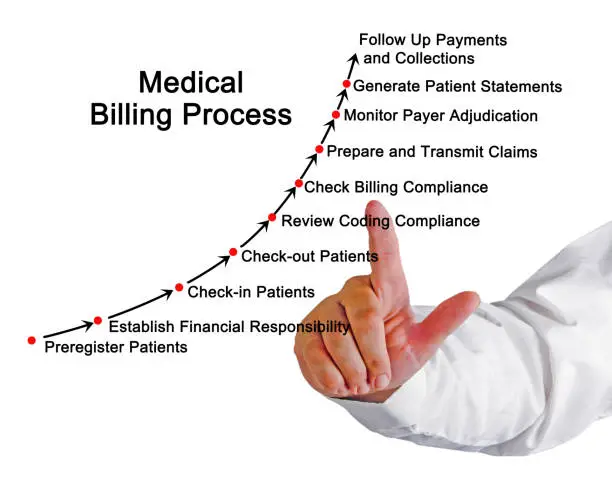
These Outline the Main Steps in the Billing Process.
-
Patient Registration: Staff capture and enter mandatory patient details.
-
Recording Services: The practice records medical services with their charges.
-
Claim preparation: This is where the billing staff prepares claims based on the information that is needed.
-
Claim submission: Claims are filed with the appropriate insurance company or payer
Top Features of Web-Based Medical Billing Software
The web-based medical billing system offers tools that assist the healthcare organisation in managing its daily financial tasks. Different software providers will have different features to offer. While some platforms primarily revolve around billing and claims, others have additional features for practice management.
Online Access to Billing Records
Use a supported browser with an Internet connection to obtain authorised billing information from the biller. This can help billing employees access a record without being physically present in the clinic. It also aids communication between employees working from various locations.
Insurance Claim Management
Claim management tools allow staff to make, submit, and track insurance claims. A few systems provide claim status updates and alerts. They assist staff in better identifying the claims that require further examination or additional action.
Improved Accessibility
Staff can view billing records from supported devices and locations. This might be useful for clinics with off-site employees or multiple branches. It also helps authorised team members access claim information without being limited to a single office computer.
Easier Team Coordination
This can benefit the staff who are authorised to work with this billing information consistently. That is, one employee prepares a claim while another reviews its status at a future time. Having clear perspectives on user permissions and processes also assists teams in coordinating their work better.
Support for Business Growth
Growing billing workload in a scaling practice: An apt web-based system helps to manage whenever billing activities, users, or locations are added, especially when the platform opens for expansion. Practices should check what plans and capacity are currently available in advance of choosing a system. Web-based and desktop medical billing differ because веб-овый options have a tonne of other benefits. In terms of location types, мы можем promise you they'll exploit it. The only way to answer this question is to answer the following: Compare and estimate features against budget, attract competitors of similar professional services, and establish a recommendation on each platform. Many of the tasks that web-based and desktop medical billing software can do are similar. The web-based systems are mainly accessed using a browser. Desktop systems are typically installed easily on personal computers or local networks. Remote access is supported in some desktop platforms but may require additional setup. What is best practice depends on the workflow, infrastructure, and budget of the practice.
|
Feature |
Web-Based Medical Billing |
Desktop Medical Billing |
|
Access |
Uses a web browser |
Uses installed software |
|
Remote Work |
Allows access from anywhere |
May require extra setup |
|
Installation |
Needs minimal installation |
Requires software installation |
|
Updates |
Usually managed by the provider |
May require manual updates |
|
Maintenance |
Often handled by the provider |
May require IT support |
|
Internet Access |
Requires a stable connection |
Some systems offer offline access. |
|
Expansion |
Depends on the service plan. |
May require extra licences or hardware |
Important Security Measures
|
Security Measure |
Description |
|
Data Encryption |
Protects stored and transferred data |
|
Access Controls |
Limits access based on employee roles |
|
Multi-Factor Authentication |
Adds an extra verification step |
Small Medical Clinics
Online billing systems are often used by small clinics to manage their patients as well as any charges, payments, and claims. These enable employees to manage day-to-day activities without having a complex setup locally. The practice should compare subscription costs and the support that they offer prior to picking a platform, however.
Medical Billing Companies
A medical billing company handles the claim and payment process on behalf of a healthcare provider. Their teams then use web-based software to schedule their work across the different customers. Because you will be working with information from more than one practice at a time, users must have the proper account permissions and data separated correctly.

Remote Billing Teams
Remote employees can use online systems to perform billing work away from the primary office. They need access so that the records can be authorised to check on claims. Organisations need to set rules for security and means of communication in remote work.
Features and Ease of Use
Begin with the basic billing features. This may consist of claim preparation, submission, payment tracking, denial management, and reporting.
Integration Capabilities
Others use only electronic health record systems, appointment scheduling tools, or practice management software. Investigate and see if the billing platform is compatible with these networks. Theo: Integration can minimise the amount of duplicate data entry and keep all information consistent.
Dependence on Internet Access
You cannot access most web-based systems without an internet connection. A slow or unstable connection will limit access to billing records and slow down everyday work. Practises should make sure their internet is reliable and have backup connectivity.
Staff Training and Adjustment
Employers might need to undergo a learning phase for the new system. Training on common billing tasks, claim follow-up, security processes, and reporting tools is needed. Clear instruction can facilitate the orientation of staff and prevent errors.
How Does Web-Based Medical Billing Help in Support of Working Remotely?
One of these reasons is the remote work burden for healthcare organisations, which is why many are looking to adopt online billing systems. Doing so could help practices better coordinate work from office to office. For instance, a billing employee could look at a claim at home while someone else might be accessing payment info from the clinic. Both will operate in the system based on their permission level. It can contribute to better coordination and aid in task management between locations. On the other hand, remote access should always be a carefully managed affair. One way to protect patient information is by using secure login methods, restricting access to only those employees who are authorised, and training the staff. They must also create a system of procedures to report all dubious practices or technical issues.
Things To Keep In Mind Before Implementing Web-Based Medical Billing
One approach to successful implementation is sufficient preparation, which allows a healthcare organisation to function on an alternative system with minimal downtime. Prior to selecting a platform, the practice should look into its billing processes and see where it has room for improvement. So, getting an understanding of claim volumes, payment processes, and reporting needs, as well as integration requirements. The organisation must also strategise for the transfer of current records. Staff have to rely on this new system, so accuracy can be crucial in checking important information; train employees on common processes and where to find help if a problem arises. A gradual rollout could help practices with complicated billing operations to adapt. Testing functionalities before full-scale implementation can identify problems early on. Post-launch, the practice can review performance and gather feedback from staff about which aspects of its work processes need to be improved.
The Future of Web-Based Medical Billing: What Is Stable
With the increasing digitalisation of healthcare organisations, web-based medical billing is still growing. Software vendors can offer better reporting, workflow automation, and integrations into other healthcare systems. Such developments help practices get organised in billing tasks directly and review financial details easily. Automation has the potential to pinpoint details that are lacking, bring attention to specific claims problems, and eliminate tedious clerical tasks.

Nonetheless, its efficiency is contingent on the capacities of the device and just how well furnished/data is entered into it. In order to fully communicate the systems, a human review remains important, both for accuracy and proper handling of billing problems. Hospital organisations should weigh new features carefully. You need to factor in the cost, security features, training requirements, and the ability to work with systems you already have. The objective is to choose a technology for accurate billing and practical daily functioning.
Conclusion
Web-based medical billing assists healthcare providers with managing patient charges, insurance claims, payments, and billing records using a web-based platform. It can help to enable remote access, facilitate teamwork, and streamline everyday finance activities. When a system is chosen with appropriate capabilities, it may also assist practices in coping with increasing workloads. Nevertheless, selecting the best software needs proper structuring. Compare prices, security, integrations, customer support, and internet requirements for healthcare organisations. Staff training and appropriate data migration are equally important. By evaluating these factors, practices can choose a system that meets their billing requirements and day-to-day operations.
FAQs
What is web-based medical billing?
Staff can use the system to document services, create claims, enter billing information, monitor payments, and pursue denials. The specific steps are based on the software and practice needs.
What are two advantages of having web-based medical billing?
Among the key benefits would be remote access, better billing record keeping coming into place, easier teamwork, and claim tracking. The results really depend on what platform you use and how well it is implemented by the staff.
Are small clinics the right fit for web-based medical billing?
Yes. However, it may well be appropriate for smaller clinics looking for a structured/organised working environment for billing. Before choosing a system, clinics should review features, cost, and accessibility, as well as support.
Is web-based medical billing secure?
However, it can also offer robust security when the platform incorporates appropriate protective measures, including encryption, access controls, and audit logs. Practices must also implement secure methods and comply with any relevant privacy regulations.